# How to Properly Clean Your Laptop Fan
As a tech enthusiast and business professional, I’ve often noticed that the little things we overlook can have significant impacts on our day-to-day operations. One such example is the importance of maintaining our laptops, particularly cleaning the laptop fan. A clean laptop fan not only keeps your device running smoothly but also extends its lifespan. In a world where time is money, the last thing any entrepreneur wants is a sluggish computer due to overheating and dust build-up.
In this guide, I’ll share the best practices for cleaning your laptop fan effectively, ensuring your device runs efficiently while highlighting how we at Best Choice can help businesses optimize their IT infrastructure. Dust accumulation can create significant problems, especially when you rely on your laptop for tasks like automation, data analysis, or navigating complex web environments.
## Understanding Your Laptop’s Cooling System
The first step in maintaining your laptop is understanding how the cooling system operates. Typically, your laptop uses fans to dissipate heat produced by the CPU and GPU. When dust and debris clog the fan and vents, the cooling efficiency diminishes, leading to overheating and unexpected shutdowns. I’ve experienced this firsthand while working on crucial projects; a sudden shutdown can lead to lost work and precious time.
## Start with the Vents
Before reaching for a screwdriver, it’s essential to begin with the most accessible part—the vents.
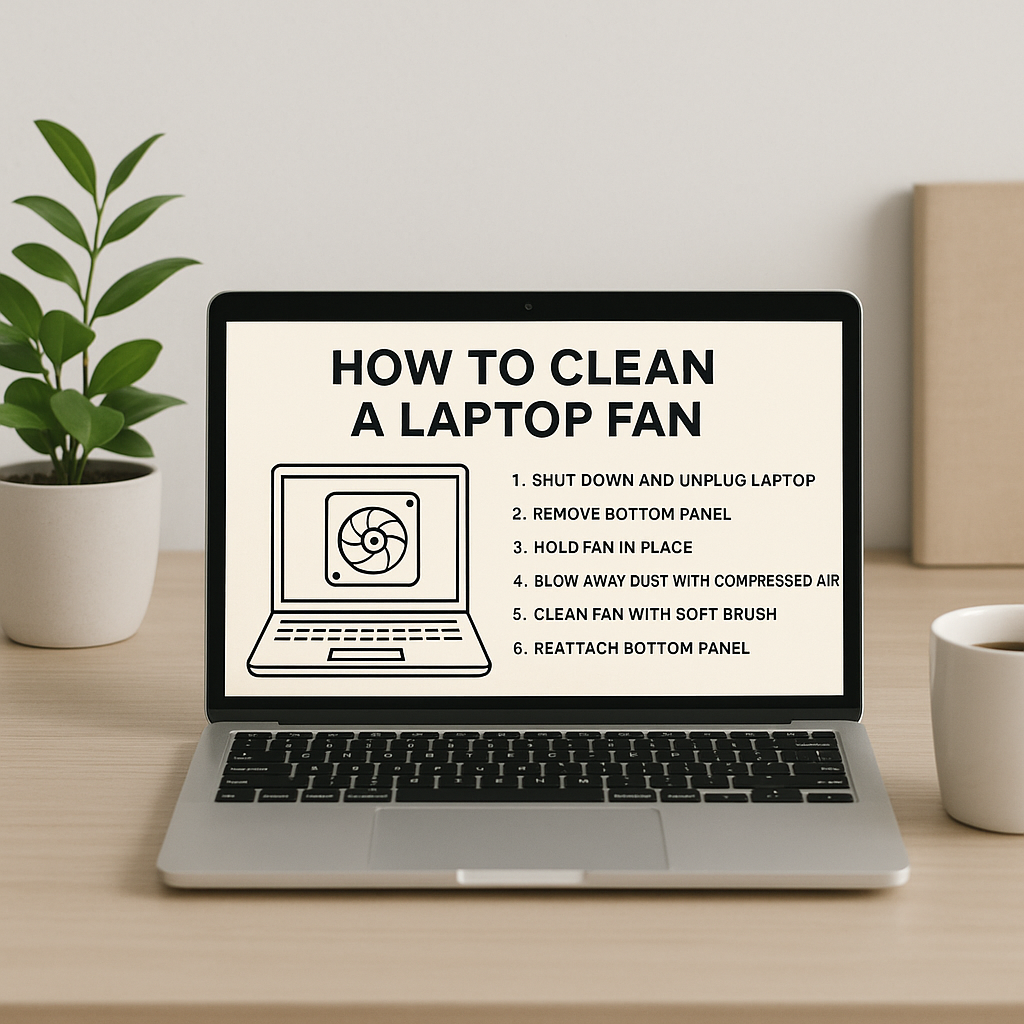
### Step-by-Step Guide to Cleaning the Vents
1. **Turn Off the Laptop**: Always ensure your laptop is powered off and unplugged before cleaning.
2. **Use Compressed Air**: Grab a can of compressed air. These are readily available everywhere and can be a game-changer. Hold the can upright and aim it at the vents.
3. **Blow Out Dust**: Carefully spray short bursts of air into the vents. This will dislodge dust and debris accumulated over time. We’ve found that regular cleaning every few months can significantly prolong the life of the device.
4. **Check Performance**: After cleaning the vents, power on your laptop and monitor the fan’s operation. You should notice a difference in noise and heat output.
## When to Open Up Your Laptop
If cleaning the vents isn’t enough, it may be time for a deeper clean. This involves opening up your laptop to get to the fan directly.
### Important Considerations for Opening Your Laptop
– **Warranty Check**: Before you begin, check if your laptop’s warranty allows for user maintenance or if it requires professional servicing.
– **Use the Right Tools**: Ensure you have the appropriate screwdrivers for your laptop model. Using the wrong tool can cause damage.
– **Document the Process**: Taking photos as you disassemble your laptop will help you remember how to put everything back together.
Now, I understand that for many entrepreneurs, time is scarce. If you don’t feel comfortable working on your device, this is where we at Best Choice can assist. We offer IT consultancy services, including device maintenance. We can ensure your laptop is not only cleaned properly but also optimized for performance based on your specific business needs.
## The Benefits of Keeping Your Laptop Clean
1. **Increased Efficiency**: A clean fan ensures your laptop operates at optimal temperatures, improving speed and performance.
2. **Prolonged Lifespan**: Regular maintenance can prevent wear and tear, saving you from costly replacements.
3. **Better Experience**: A laptop that operates smoothly enhances productivity, allowing you to focus on what matters—growing your business.
## Additional Tips for Laptop Maintenance
– **Temperature Monitoring Tools**: There are several software solutions available for monitoring your laptop’s temperature and performance. Tools like HWMonitor can provide insights into fan speeds and temperatures.
– **Regular Updates**: Ensure your operating system and applications are up to date to optimize performance and security.
– **Avoid Overworking Your Laptop**: Be mindful of running intensive applications simultaneously, as this can put extra strain on the cooling system.
## Popular Open-Source Solutions for Device Monitoring
In Denmark and across Europe, businesses are increasingly relying on open-source software for various IT tasks. Tools like **Open Hardware Monitor** provide insight into your system’s metrics, including temperature readings for your laptop. Such software can complement your cleaning routine by alerting you to potential overheating issues before they escalate.
## Conclusion
Cleaning your laptop fan is an essential yet often overlooked task that can save you time and money. By keeping your laptop well-maintained, you not only enhance its performance but also safeguard your productivity as a business decision-maker. Whether you choose to tackle it yourself or seek help from professionals, it’s undeniable that a clean laptop leads to a happier, more efficient work environment.
If you’re feeling overwhelmed or would rather leave it to the experts, don’t hesitate to reach out to us at Best Choice. We provide tailored IT consulting and maintenance services designed to meet your needs, ensuring your technology remains a tool that empowers you rather than a hindrance. Let’s keep your business running smoothly together!