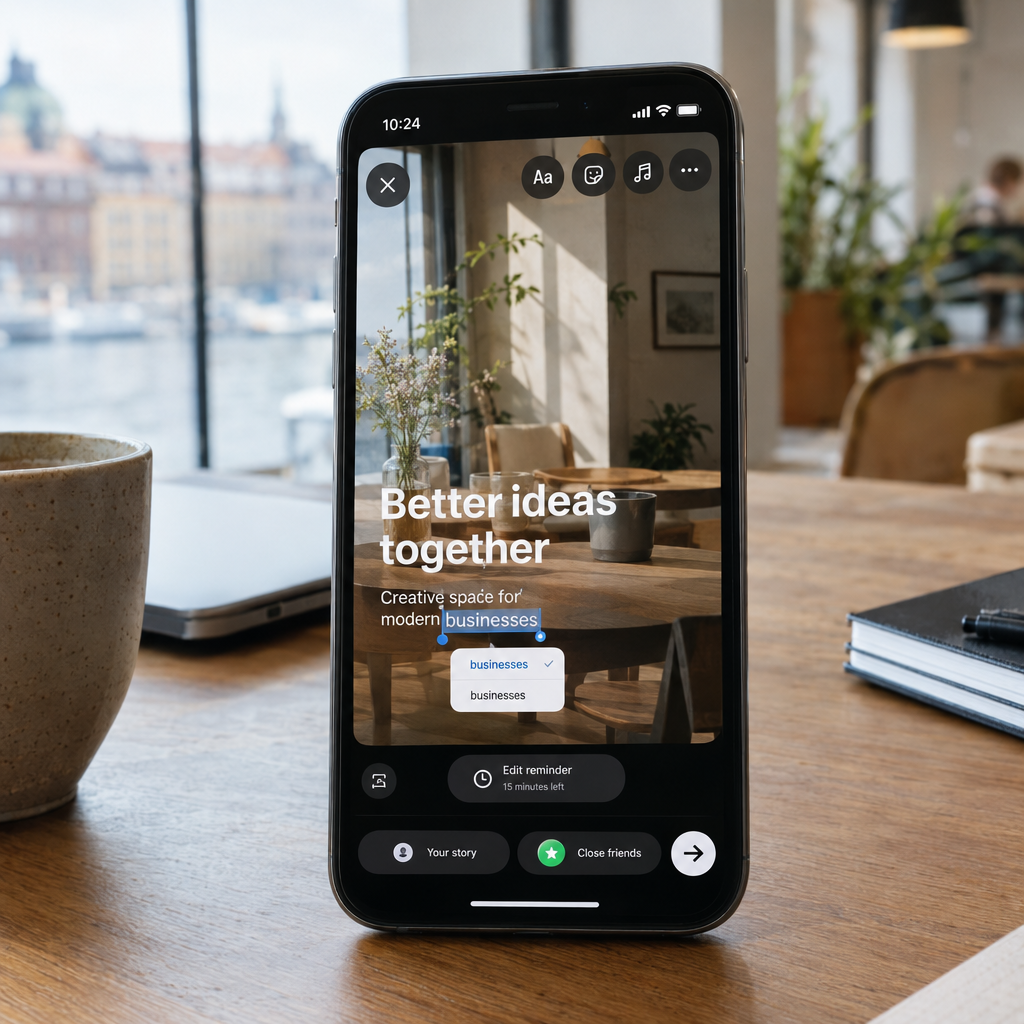
You Can Finally Edit an Instagram Story Without Deleting It
A typo in an Instagram Story used to mean deleting the post and publishing it again. Instagram is introducing a 15-minute window to make certain changes after publishing, giving businesses a chance to fix small mistakes without starting over.
For a café, clinic, online shop or booking service, that small change can make social media work less stressful. At Best Choice, we help businesses build practical digital workflows around tools like Instagram—so teams can publish more carefully, respond faster and spend less time correcting avoidable errors.
1. What the 15-minute editing window means
The new feature gives you a short period after posting an Instagram Story to correct eligible details without deleting the entire Story. The exact editing options may depend on the feature’s availability and what you are trying to change, so check the controls in your Instagram app before relying on it for a particular edit.
It is still wise to review a Story before publishing. Think of the editing window as a useful safety net for a small mistake, not a replacement for checking prices, dates, links and other important information.
2. Why this matters to businesses
A Story is often used for timely communication: a lunch special, a last-minute appointment, a delivery update or a limited-time offer. If a detail is wrong, deleting and reposting can interrupt the message and leave customers unsure which version is correct.
For example, a Copenhagen café could correct a typo in its daily menu, while a clinic might fix a time in an appointment reminder. A web shop could make a quick correction to an offer, helping avoid confusion and unnecessary customer enquiries.
3. Make quick corrections carefully
When you spot an error, open the Story and check which editing options are available. Correct the detail promptly, then review the updated Story to make sure the change is clear and the rest of the content still makes sense.
- Check critical details first: prices, dates, opening hours and booking information.
- Confirm the change is visible: view the Story as a customer would.
- Repost only when needed: some changes may not be editable, or a full replacement may communicate better.
For important announcements, consider adding a clear correction or follow-up if customers may already have seen the original. This is especially useful when the mistake affects a price, promotion or service time.
4. Build a better publishing workflow
The best way to reduce social media mistakes is to make publishing more organised. We can build a custom workflow that collects Story text, images, links and campaign details in one place, then routes each post to the right person for review before it goes live.
For a small marketing team, this could mean a simple approval step for every promotion. For a business with several locations, it could include location-specific opening hours and reusable templates, helping staff publish consistent updates without copying information from scattered documents.
5. Connect Instagram with your business systems
Instagram is more valuable when it supports the rest of your business. We can help connect your social media processes with a CRM, booking system, online store or customer-support workflow, depending on the platforms and integrations available.
For instance, a salon could direct Story viewers to a booking page, while a web shop could track which campaigns bring visitors to product pages. A custom dashboard can help organise campaign links and results in one place, so you can see what attracts attention and leads to enquiries or sales.
Platform permissions and Instagram’s available integrations can limit what external systems are allowed to change. We design workflows around those limits rather than promising that a separate tool can edit every Story directly.
6. Turn a small feature into a practical advantage
Use the 15-minute window as one part of a simple quality process: prepare the content, check it, publish it and quickly confirm that it appears as intended. Keep accurate business details in a shared source, such as an approved schedule or product feed, so staff are less likely to post outdated information.
It is also useful to decide who can approve urgent changes and who handles customer questions if a correction affects an offer. These small decisions save time during busy periods and help your team communicate consistently across Instagram and other channels.
Make social media easier to manage
Being able to edit an Instagram Story without deleting it can save a few minutes and prevent unnecessary reposting. A clear publishing process can save much more by reducing mistakes, keeping information consistent and connecting social activity to real business outcomes.
At Best Choice, we build and improve digital workflows for businesses in Denmark and across Europe. Contact us to discuss a custom solution for social media, automation, integrations or your wider business systems.