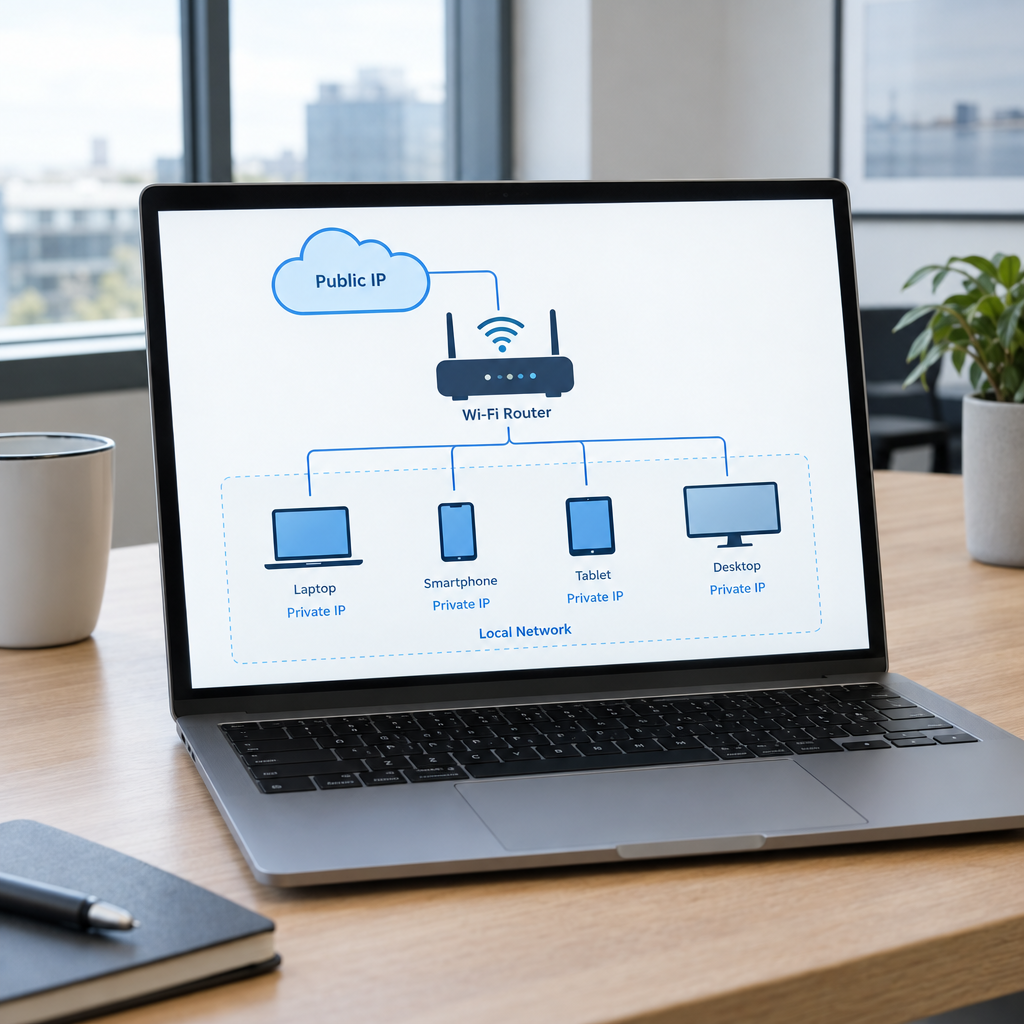
Every business connected to the internet uses IP addresses, but not all IP addresses do the same job. A public IP address helps identify a connection to the wider internet, while private IP addresses help devices communicate inside a local network, such as an office, café, warehouse or clinic.
Knowing the difference can help you troubleshoot connectivity, plan secure remote access and choose the right setup for business systems. At Best Choice, we help businesses connect their networks, applications and devices so everyday work runs reliably and securely.
1. What is a public IP address?
A public IP address is used to identify a network connection on the internet. It is typically assigned to a router or firewall by an internet service provider, allowing traffic to travel between your business network and online services.
For example, when a customer visits your webshop, the connection reaches the public-facing side of your hosting or network setup. Public IP addresses can be static, meaning they stay the same, or dynamic, meaning they may change over time. A static address can be useful for services that need a consistent point of contact, such as a business VPN or a server.
2. What is a private IP address?
Private IP addresses are used inside local networks and are not directly reachable from the public internet. Your office router might use one private address, while laptops, printers, payment terminals and other devices each use their own address within the network.
Common private IPv4 ranges include 192.168.x.x, 10.x.x.x and 172.16.x.x to 172.31.x.x. A warehouse, for example, might use private addresses to let barcode scanners communicate with inventory software, without exposing those devices directly to the internet.
3. How do public and private addresses work together?
In many business networks, a router or firewall uses Network Address Translation (NAT) to pass traffic between private devices and the public internet. When an employee browses a website, the router sends the request using the network’s public address and keeps track of which device initiated it. The reply is then directed back to the right device.
This allows many devices to share one public IPv4 address. However, some internet providers use carrier-grade NAT (CGNAT), where multiple customers share a public address. If you need to host a service or accept incoming connections, ask your provider whether you have a dedicated public IP and whether the required traffic can reach your network.
4. What does this mean for business security?
A private IP address does not automatically make a device secure. Firewalls, access controls, software updates and sensible network design still matter. A poorly protected laptop or printer can create risk even if it is not directly visible from the internet.
We recommend separating devices with different needs—for example, staff computers, guest Wi-Fi, payment systems and building equipment. This can limit the impact of a problem and make network access easier to manage. For a café, customers can use guest Wi-Fi without being given access to the point-of-sale system or office files.
5. When should you check or manage your IP setup?
Understanding your IP setup can help when a video call drops, a printer disappears, a remote worker cannot connect or a business application needs to communicate with another system. It is also important before setting up a VPN, connecting a new site or making a server available to external users.
- Check the provider setup: Confirm whether your public IP is static, dynamic or behind CGNAT.
- Document important devices: Keep a simple record of network equipment, printers, servers and their roles.
- Avoid unnecessary exposure: Do not forward internet traffic to devices unless there is a clear business need.
- Plan for growth: Choose an IP and network structure that can support new staff, locations and systems.
6. How can a tailored IT setup help?
Every business has different network requirements. A clinic may need dependable access to booking and patient administration systems, while an online store may need secure links between its webshop, warehouse and customer service tools. We at Best Choice can assess how your devices and services connect, then build a setup that fits your workflows.
Where appropriate, we can configure or improve established tools such as OPNsense or pfSense for firewall and network management, and connect the network with your cloud services or custom business applications. We can also create tailored monitoring and integration solutions that help your team spot issues sooner and reduce manual troubleshooting.
Conclusion
In simple terms, a public IP address connects a network to the internet, while private IP addresses help devices communicate within that network. Understanding how they work together makes it easier to plan secure access, troubleshoot problems and prepare your IT for growth.
If you want to improve your business network, connect systems or plan secure remote access, contact Best Choice. We’ll help you find a practical solution that supports your business today and as it grows.